
Table of Contents
Product Option Combination
- Current Version: 1.0
- Date Created: 07 August 2021 (Saturday)
- Compatibility: OpenCart Version 2.3x, 3.x
- Framework: Opencart
Description
This module allows to create combination for product options, for example: For interlinked options such as Card Size and Card Color. Define combination pairs of different valid options in settings page those combination pairs can latter use to generate different option value combinations with multiple attributes like image, model, quantity, price, so on. With help of different combinations customers can choose valid options only let’s say: Store have t-shirts of RED COLOR in sizes S, M, L,XL ,whereas, for BLUE COLOR only S, L size available and YELLOW COLOR can be for size M, L , XL only. With help of this extension define combinations for SIZE and COLOR at combination page along with it adding options at product page.
At front page when user choose RED COLOR then all sizes get available, while choosing BLUE M, XL size gets disabled similarly M, L, XL available for YELLOW only.
Features
- Make N number of options combination pairs
- Use option type “Select” and “Radio” only
- Non-paired option values become non-selectable
- Option to manage combination attributes like SKU, EAN, UPC, IMAGE, etc
- Option to control combination stock (By default stock management from product options tab)
- Control single weight for option value pair (If not utilize combination weight then default options weight pickup)
- Sort combination pairs at same step with define combination for options
- Create as many as different valid combinations
- Prevent accidental purchase of different combination stock items (I.E: Color, Size)
- Live Price update of product upon option selection and quantity change
- Live Price works for non-combination options as well
- Journal3 Live Price Pre Compatibility with this module
- Product model update upon selection of paired option value
- Decide mode for product model update
- Journal 3 Theme Compatible
- OCMOD Supported
Installation Guide
-
Opencart Version 2x
1. Sign in to your website Administrator.
2. Extract Product-Options-Combination-Pro-2x.zip file.
3. Copy all files from Product-Options-Combination-Pro-2x\upload\ directory and upload files into your website folder.
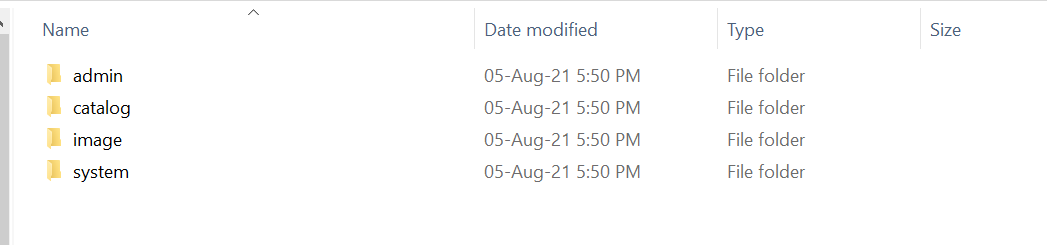
4. Go to Extensions >> Extension Installer to upload an extension cioptionscombination.ocmod.xml file from Product-Options-Combination-Pro-2x\ directory.
5. Go to Extensions >> Modifications and click on the refresh button. This will re-build all modifications.
6. Install CI - Product Options Combination Settings Extension.
Go to Admin >> Extensions >> Modules >> CI - Product Options Combination Settings.
Note: As soon as Setting page open script will create necessary database tables to avoid any unexpected issue.
Configuration
-
Setting
Go To Admin >> Extensions >> Ci - Product Options Combination
1. Install Product Options Combination Settings

2. Edit Product Options Combination Settings

3. Options Column Settings

-
Product Options Combination
Go To Admin >> Ci - Product Options Combination >> Product and Options Combination
1. Setting - Set Options For Combination

1. Add New Product and Option Combination

2. Add New Product and Option Combination - Choose Product

3. Add New Product and Option Combination - Select Option Combination

4. Add New Product and Option Combination - Generate All Possible Combinations

-
Edit Products
Go To Admin >> Catalog >> Products >> Edit Product >> Option Tab
Add All Product Options according to Product Options Combination Information

Add First Product Option according to Product Options Combination Information

Add Second Product Option according to Product Options Combination Information

-
Output Frontend
Output Card Colors - Brown Black

Output Card Colors - Cream White Black

Output Card Colors - Dark Black

Rate Opencart Extension
If you find this extension useful and work as per your requirements, Please provide 5 Star rating & review from your valuable time.
We appreciate your response, in case you facing any issue directly mail us. We are here
to help you. We are happy to help you.